
Expense claims break down when receipts reach finance weeks after the spend. By then, slips have faded, documents are missing, and staff must rekey each line into spreadsheets and finance systems. SmartDoc Go™ changes the timing. Staff photograph each receipt when they pay, SmartDoc™ reads it into a claims register, and SmartOS™ carries approved records through to posting and project spend reporting.
The control risk starts when receipts wait weeks for filing
A Singapore firm sends project teams overseas to build events and installations. Staff pay for taxis, meals, materials, and hotels as the work happens, then claim the money back after they return. Staff build each claim by hand. The staff member collects the receipts, keys each line into a spreadsheet, adds the currency conversion, enters the same line into the finance system, assigns a cost code, and numbers every receipt against its row.
The gap between payment and filing creates control risk. A thermal taxi slip can fade in a wallet. A receipt can disappear before the staff member reaches the desk. When the source document is gone, finance cannot substantiate the expense. The company either rejects a valid claim or approves a line without evidence.
The receipts that survive are hard to process consistently. One trip can produce a thermal taxi slip, a ride-hail PDF, a restaurant invoice in Chinese, a handwritten chit, a hotel folio, and several receipts on one scanned page. Template OCR expects fixed layouts, so it struggles with that variety, handwriting, and angled photos. Finance keeps the work manual because the source documents do not fit one template.

Receipts stay claimable when staff photograph them at payment
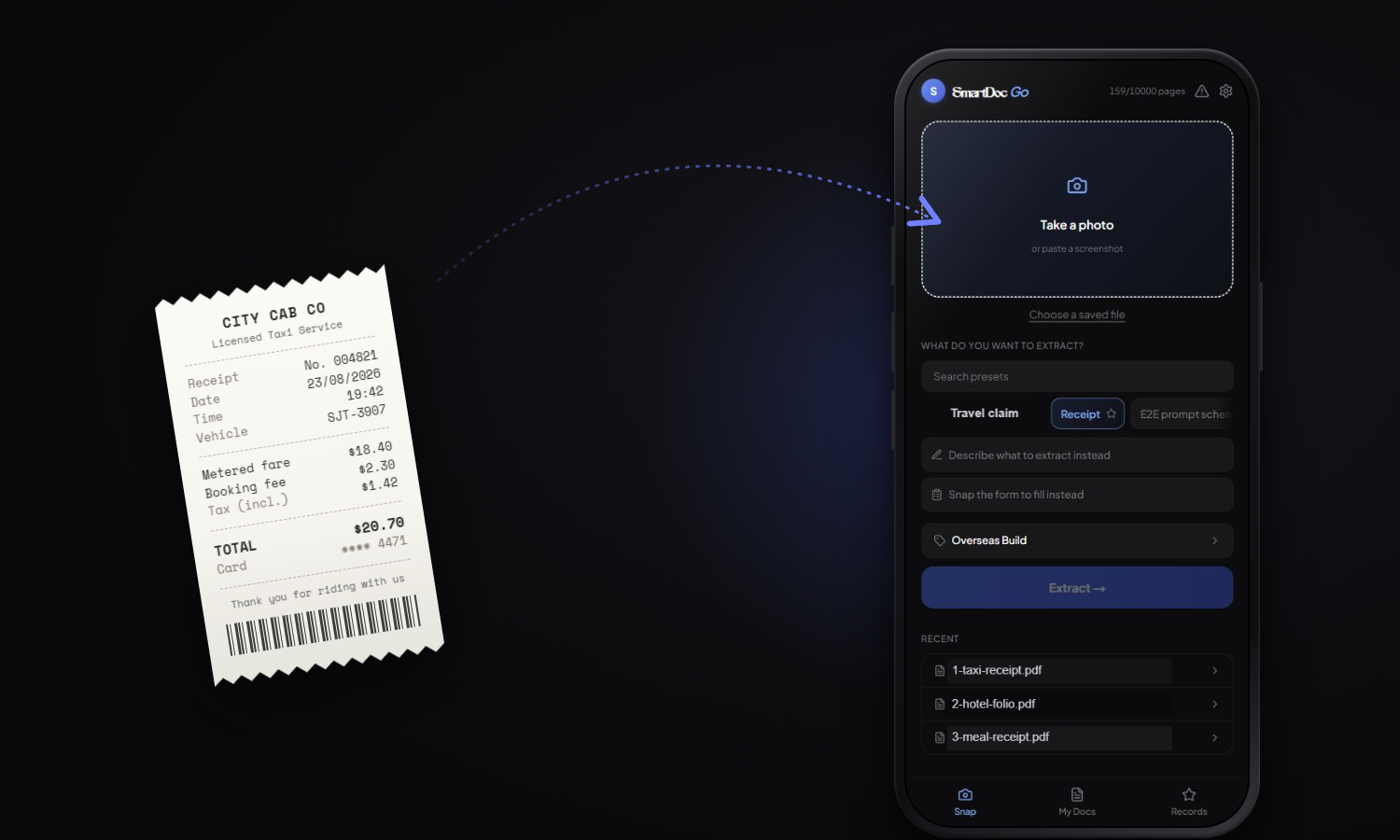
SmartDoc™ reads invoices, statements, and other finance documents in the back office. SmartDoc Go™ brings that same capability to the phone, where the receipt is created. A staff member photographs the receipt at the taxi, counter, or hotel desk, then tags it to the project. SmartDoc™ reads the receipt immediately, before it fades or goes missing. The claim builds during the trip instead of starting after the staff member returns.
Finance can review faster when every value links back to the receipt
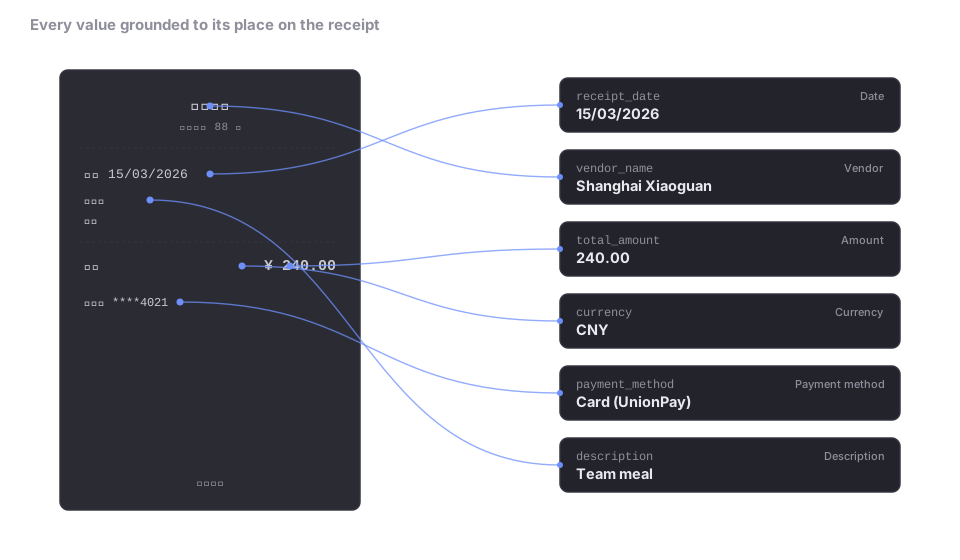
SmartDoc™ reads six fields from each receipt: date, vendor, amount, currency, payment method, and description. It reads across formats and languages because it interprets the document content instead of relying on fixed positions. Each value is grounded to the exact place on the receipt where it came from. Finance can check a figure in one click instead of opening the source document and searching manually.
Receipts for the same trip collect under one project label and export as a claims register. Each receipt becomes one row, with the extracted fields already filled. Finance receives an assembled table instead of a stack of documents to key.
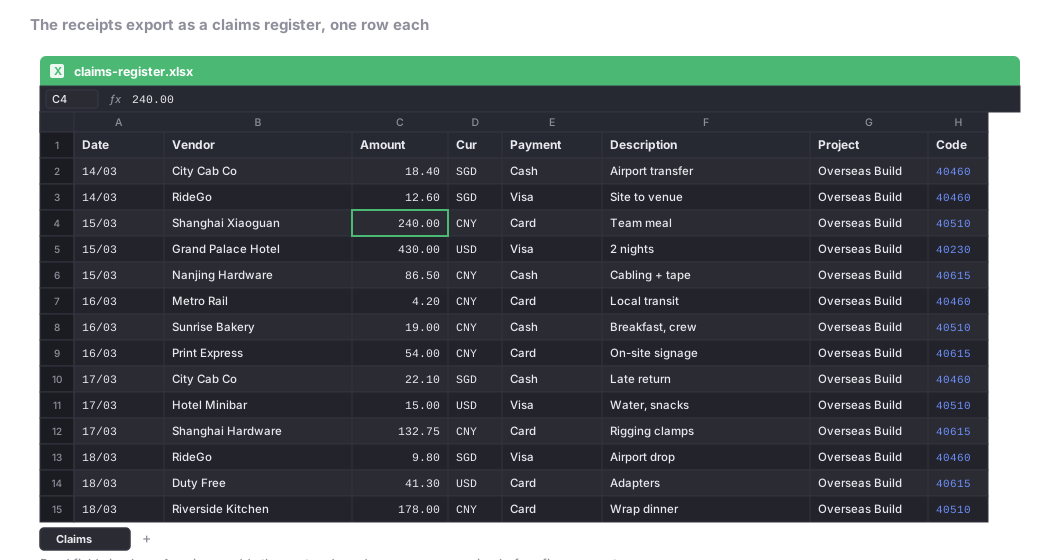
SmartDoc Go fills the claim rows, finance reviews them
The register remains a draft claim. Some fields are not printed on the receipt. A reviewer still assigns the cost code from the chart of accounts. The reviewer also adds the exchange rate and converted amount. Policy checks stay with finance, because checking whether a meal falls within a per-diem cap is a rules decision rather than a receipt extraction task.
The operating impact is clear. A frequent traveller can file about 150 receipts a month, and compiling them manually can take about five hours. SmartDoc Go™ reduces the data-entry work because the reviewer checks rows that already exist instead of typing every line from scratch.
Structured claim rows make downstream automation easier
Once receipt and claim data are structured, it becomes easier to automate the work that comes after extraction. A workflow built in Copilot, Claude Code or another agentic tool can read the register, compare each row with project, purchase order and vendor references, prepare exceptions for review and draft the posting instruction. The important change is that the automation works from rows, fields and references instead of from loose images and email attachments.
SmartOS™ is OphieAI's operating layer for this kind of agentic workflow. It uses the structured claims register to route each row through validation, review and posting steps. Finance still controls approval. The model does not approve claims, change claim status or authorise payment. After a reviewer approves a row, SmartOS™ can post the approved entry and refresh project spend from the approved data.
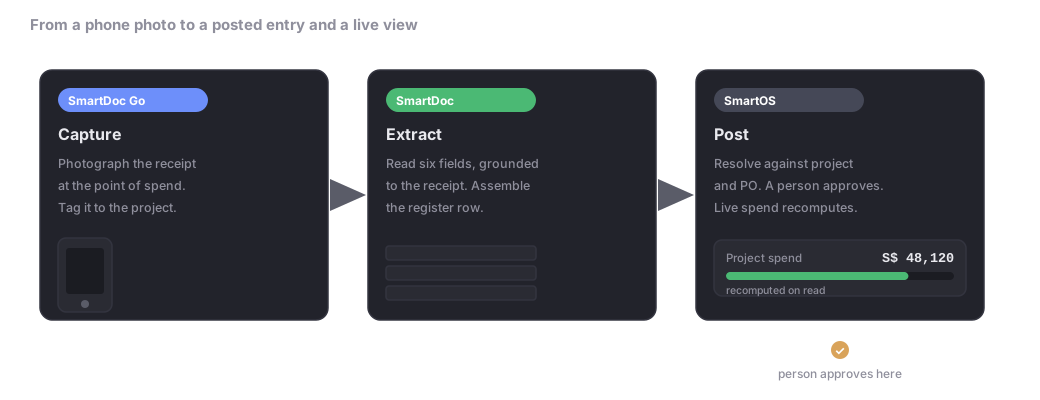
Receipt capture belongs where the receipt is created. Capturing each receipt at the point of spend keeps the expense substantiated, turns claim preparation into review work, and gives finance a cleaner path from payment to posting.
SmartDoc™ reads and grounds each receipt at the point of spend. SmartOS™ posts the approved result and keeps project spend current.