
A project-based contractor manages multiple jobs through spreadsheets, PDFs and email. Purchase orders, supplier invoices and progress claims sit across shared folders and finance workbooks. The practical question is whether an ERP can be built around those project records instead of first moving the company onto a new system.
A project-based contractor manages multiple jobs through spreadsheets, PDFs and email. Purchase orders, supplier invoices and progress claims sit across shared folders and finance workbooks. Finance keeps one view for accounting and another for project control, then reconciles the two by hand.
The question was practical: can we build a small ERP around the way this contractor already runs projects, without first moving the company onto a new system? The answer was to leave the live data where it already sits. Google Sheets holds the project records. SmartDoc reads PDF invoices and other source documents. Claude Code runs the workflow, checks the data against those records, and sends each proposed change back to a person for approval.
On one project, a routine check surfaced a budget exposure early enough for the team to contain it. The team caught it because someone looked at the right file at the right time.
A fifty-person contractor cannot absorb a nine-month ERP project
Panorama Consulting's 2026 survey puts the median ERP project at nine months, with almost a quarter finishing late. The median respondent turns over US$200 million a year, so that benchmark comes from companies with a project management office, a systems team and a change budget. A fifty-person contractor has none of those. The implementation work falls to the people already running the company's daily operations.
An ERP also pushes the company toward a general process. The gaps surface late, then drive scope expansion and custom development. This contractor's lifecycle runs through sales, tendering, procurement, delivery, claims and close-out. Those stages are more specific than a generic project template. A conventional implementation also starts by moving the company away from the spreadsheets that carry the live work.
The system works because the project records stay in place
A lite ERP starts from the opposite decision. The spreadsheets and documents stay in place, and they remain the record. The system has five parts.

At the bottom sits the company's own cloud drive. The project records cover project, procurement, invoice, claim and vendor information. Documents stay in the folder tree the company already uses.
Above the drive sits SmartDoc. Much of the operating data does not start in a spreadsheet. It arrives as PDF invoices, purchase orders, claims and supporting documents. SmartDoc extracts the vendor, dates, amounts, line items and reference numbers, then grounds each value back to the source document so finance can see where it came from.
Above SmartDoc sits a small set of code tools. They do the work that must be exact. Every financial figure is computed when the system reads it and is never stored as a separate number, so site progress and payment out cannot drift away from the project records behind them. One module handles all reads and writes, so a person editing the claims spreadsheet and an automated workflow cannot overwrite each other.
Claude Code runs the workflow. It reads the project records and extracted document data, follows the customer's written procedures, and calls the right tool when it needs to create a purchase order, file an invoice, refresh a claim or answer a portfolio question. The workflow lives in a text procedure that the customer can inspect and change.
The interface is a project cockpit. It shows the task queue, project stages, documents and exceptions. Claude Code reads the project files, decides which workflow applies, and brings a person to the approval point.
AI handles messy project judgment; code protects the financial records
Claude Code handles the work that forms handle poorly. It matches an invoice with no purchase order number, interprets a plain-language requisition, finds the right project folder, answers a question across project records, and explains which files support the answer. SmartDoc extracts the document data first, so Claude Code receives structured fields from invoices and other PDFs instead of guessing from raw document text.
Ordinary code handles the parts that must be exact. It approves a purchase order, files an invoice and marks it paid. The code checks that each change is valid before making it. Claude Code does not write directly to the project records. When it wants to change state, it calls a tool, shows the proposed change, and waits for a person to confirm. Each workflow checks its own work afterward and writes the row counts and duplicate checks into a run log.
The same workflow pattern covers invoices, purchase orders, claims and portfolio questions
Finance, invoice matching. A supplier invoice arrives by email with no purchase order number and no project number. SmartDoc extracts the vendor, invoice date, amount and line items from the PDF. Claude Code matches those fields to the job and purchase order through the vendor records, checks the invoice sheet for duplicates, computes the remaining purchase order balance, and presents what it found. Nothing is filed until finance confirms or corrects it.
Project lead, requisition to approved purchase order. A project lead needs to commit spend to a supplier and raises the requisition in plain language. Claude Code turns that request into a draft purchase order action. Operations sees it on the task list and issues the purchase order. The workflow fills the company's own template, takes the next number from the purchase order sheet, renders the PDF into the project folder, and sets the status to awaiting approval. Management reads the PDF and approves it. The system records who approved it and when.
Finance, progress claim refresh. Finance updates the progress claims spreadsheet in the drive the same way as always, then presses refresh in the app. The system recomputes project progress and payment out from the project records. The watchdog raises an alert because payment out has run materially ahead of certified progress. There is no import step and nothing to reconcile, because the figure was never stored.
Management, asking a question across the portfolio. Management wants to know which jobs carry the most exposure to one supplier. Instead of opening each project folder in turn, a manager asks in plain language. Claude Code reads across the project records and the supporting documents, then names the files it used. The same question works inside one project, where it can compare a purchase order against the invoices billed to it, or pull a figure out of a document nobody has opened in months.
The company gets project control without rebuilding its operating model
The company keeps the files it already uses. There is no need to do massive database migration. The first months do not disappear into spreadsheet exports and schema mapping. The project records stay where finance already edits them, and the PDFs stay in the project folders where the team already stores them.
The drive remains the permission system. The company owns the folders. Membership runs through groups. Each sheet and folder is shared with the people who should see it. There is no second access model for the team to maintain.
The build stays small because it starts from live files and real workflows. We scope these builds at one to two months against the nine-month median ERP delivery timeline. The company pays for the workflows it needs, the tools that control writes to the project records, and the screens each role uses to review the work.
Process is the part ERP projects usually bury. It gets split across configuration, integrations and custom modules. Here, it sits in text workflows that call SmartDoc, code tools and the project records the team already trusts. The customer can read the workflow, test it on real files, and change it when the operating rule changes.
The interface is the one part we build from scratch. It carries the company's own lifecycle stages, vocabulary and role-specific tasks. People see the work they already do, with checks added at the points where mistakes cost money.
The ERP catches payment and progress gaps from live project records
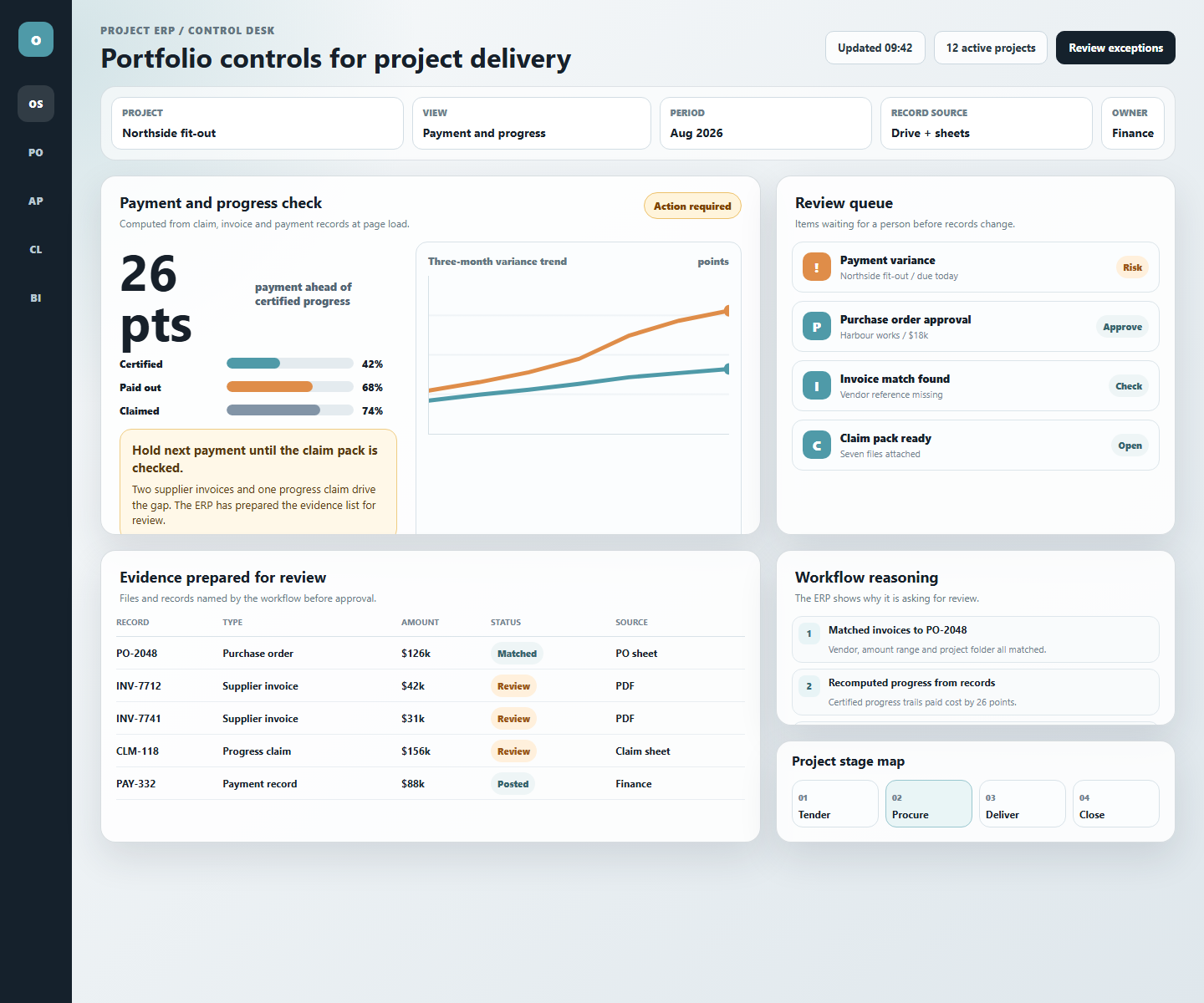
The view above shows payment running materially ahead of certified progress. Many project businesses find that situation by hand, on the jobs where someone thinks to check.
The ERP starts where project work already happens
For a contractor like this, the urgent problem is visibility. The company needs to know which commitments are over budget, which invoices do not match a purchase order, which claims are running ahead of site progress, and which suppliers create concentration risk across the portfolio.
That control starts with clean project records, document extraction that finance can verify, workflows that follow the company's actual procedures, and code that protects the numbers when records change. Once those foundations are in place, a lite ERP can give management better control while the business keeps working in the files it already trusts.